In 2021, YouTube emailed every monetizing creator outside the United States: Google would start deducting U.S. taxes from their earnings. In this post I explain what the email means, how the AdSense tax form works, and how much tax you will pay with and without a tax treaty. In the video above, I explain the changes and show how to fill in the tax info in AdSense.
Update (October 2026): These rules are still in force. Today you submit and check your tax info in AdSense for YouTube: Payments > Payments info > Manage settings > Payments profile > United States tax info > Manage tax info. Tax forms also expire, so YouTube asks you to submit them again every few years. YouTube Help asks creators to submit their tax form, and claim a treaty benefit if they are eligible, by December 10 each year.
In this article
The Email YouTube Sent to Creators (2021)
Hi there,
We’re reaching out because Google will be required to deduct U.S. taxes from payments to creators outside of the U.S. later this year (as early as June 2021). Over the next few weeks, we’ll be asking you to submit your tax info in AdSense to determine the correct amount of taxes to deduct, if any apply. If your tax info isn’t provided by May 31, 2021, Google may be required to deduct up to 24% of your total earnings worldwide.
What do I need to do?
In the next few weeks you will receive an email to submit your tax information in AdSense. The online tax tool in AdSense is six steps and will ask you a series of questions to guide you through the process to determine if any U.S. taxes apply. For more information on these changes and a list of tax info to prepare, visit our Help Center.
Why is this happening?
Google has a responsibility under Chapter 3 of the U.S. Internal Revenue Code to collect tax info from all monetizing creators outside of the U.S. and deduct taxes in certain instances when they earn income from viewers in the U.S.
For creators outside of the U.S., we will soon be updating our Terms of Service where your earnings from YouTube will be considered royalties from a U.S. tax perspective. This may impact the way your earnings are taxed, and as required by U.S. law, Google will deduct taxes.
How will my earnings be impacted?
If you provide your tax info, U.S. taxes may only be applied to your monthly U.S. earnings from AdSense (revenue earned from viewers in the U.S. through ad views, YouTube Premium, Super Chat, Super Stickers, and Channel Memberships). If no tax info is provided, your tax rate may default to the higher individual backup withholding rate (24% of total earnings worldwide). To estimate the potential impact on your earnings follow these instructions.
Thanks,
The YouTube Team
The AdSense Tax Form: How Much Tax Will You Pay?
When you sign in to your Google AdSense account, you will see a message about required tax info, both in a box on the page and under the notification bell icon. When you click to fill in the information, AdSense opens a W-8BEN form (for individuals) or a W-8ECI / W-8BEN-E form (for businesses, companies and other legal entities).
These forms ask for a lot of personal or business details. If you are not sure what to enter, get help from a tax advisor or from your country’s tax office.

In step 3 of the U.S. tax info form, AdSense asks whether a tax treaty exists between your country of residence and the U.S. (see the IRS links at the end of this post). How much the treaty lowers your tax depends on your country and its rules.
If your country has a treaty, you must enter a TIN (Taxpayer Identification Number). For individuals, this can simply be the personal identification or tax number your country gives you. Every country is different, so check with a tax advisor who has international experience.
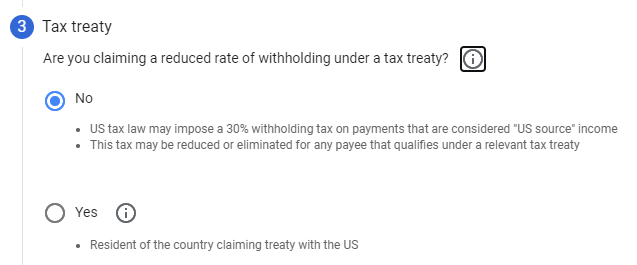
If you don’t provide the right information, an individual account falls back to a flat 24% deduction on your worldwide earnings.
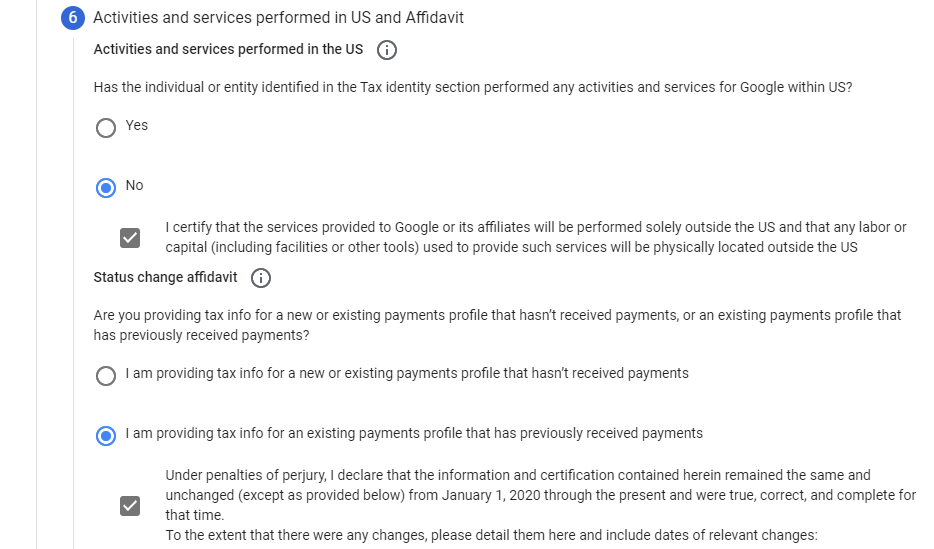
Even after you submit the form, the tax on earnings from U.S. viewers stays at 30% if your country has no tax treaty with the U.S.
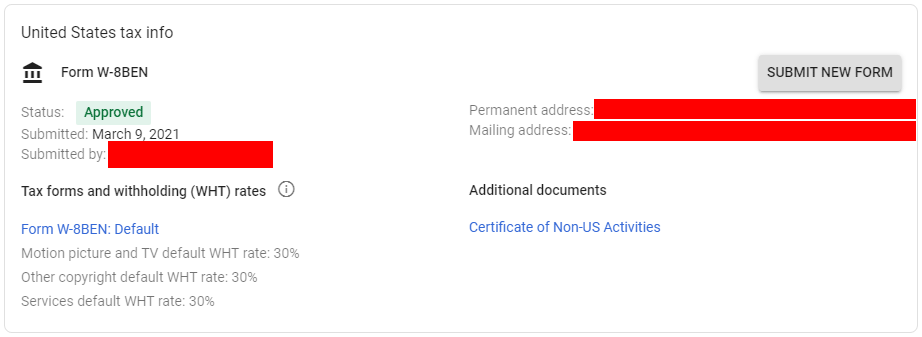
Default U.S. tax withholding (WHT) rates without a treaty:
- Motion picture and TV: 30%
- Other copyright: 30%
- Services: 30%
What About Your Privacy?
Google reports this tax information to the IRS, the U.S. tax authority. That means the IRS receives a huge amount of data about creators and organizations from all over the world. What this means for privacy remains to be seen.
One thing is certain: the world we live in is changing fast, for better or for worse.
The Decision Is Yours: Two Options
Option 1: Submit Your Tax Info
You submit the correct tax form and pay up to 30% tax on your earnings from U.S. viewers only. This rate can go down to 0% for some countries and for tax-exempt entities. Earnings from other countries stay the same as before and follow the tax rules of your own country.
Example: Your country has no tax treaty with the U.S., so you pay the full 30%. You earn $1,000 per month, and $500 of it comes from U.S. viewers. Google deducts 0.30 x $500 = $150, so you receive $850 instead of $1,000. The more U.S. viewers you have, the bigger the deduction.
Option 2: Don’t Submit Your Tax Info
If you don’t submit a valid tax form, Google has to withhold at the maximum rate. According to YouTube Help, an individual account loses 24% of its total worldwide earnings (backup withholding). A business account outside the U.S. loses 30% of its U.S. earnings. This is why you should submit your tax info as soon as possible.
Example: Same as before, you earn $1,000 per month, but this time you did not submit any tax form. With an individual account, Google withholds 24% of everything: $1,000 – (0.24 x $1,000) = $760 per month.
If you are a U.S. citizen or resident living outside the U.S., you may still have U.S. tax obligations. Ask your tax advisor so you make the right choices when you fill in the AdSense tax form.
Also see: How COPPA may impact your YouTube monetization.
Resources and Links
- U.S. tax requirements for YouTube earnings
- Tax requirements for MCNs and affiliate channels
- Submitting your U.S. tax info to Google
- Check your AdSense account type
- U.S. IRS Income Tax Treaties A-Z
- U.S. IRS Tax Treaty Tables (see the royalties, film and TV, and copyright columns)