
In this article
Introduction
Microsoft officially ends support for Windows 10 on October 14, 2025. After that date, regular security updates will stop for most users.
But the good news is: with Microsoft’s Extended Security Updates (ESU) program, you can keep your Windows 10 PC secure until October 13, 2026 – and in some cases, you can even do it for free.
In this guide, we’ll explain step by step how to extend Windows 10 support, who is eligible, and the 3 official methods Microsoft offers.
Why Extend Windows 10 Support?
-
Many older PCs cannot upgrade to Windows 11 24H2 or 25H2.
-
Windows 10 is still stable and reliable for daily work.
-
Security updates are critical to protect against new vulnerabilities.
If you’re not ready to upgrade, or your computer doesn’t support Windows 11, this tutorial is for you.
3 Official Ways to Enroll in ESU
1. Free with Microsoft Account + Backup
If you enable device backup in your Microsoft account, you can get extended updates at no extra cost.
This includes backing up your settings, apps, and preferences.
👉 This is the easiest and most common free option.
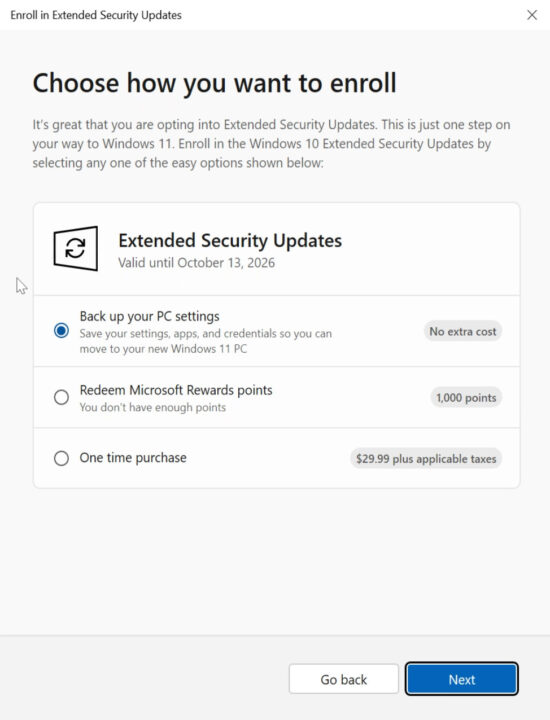
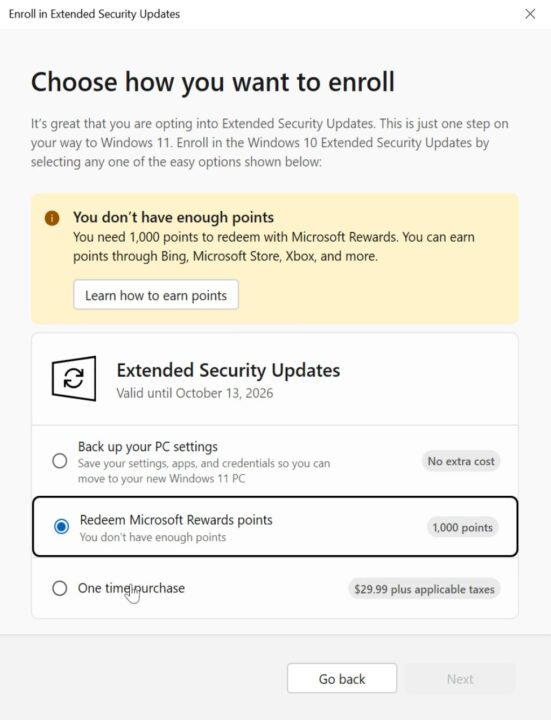
2. Using Microsoft Rewards Points
If you have 1,000 Microsoft Rewards points (earned through Xbox, Microsoft Store, Bing, etc.), you can redeem them to extend support.
👉 Check your account balance at Microsoft Rewards.
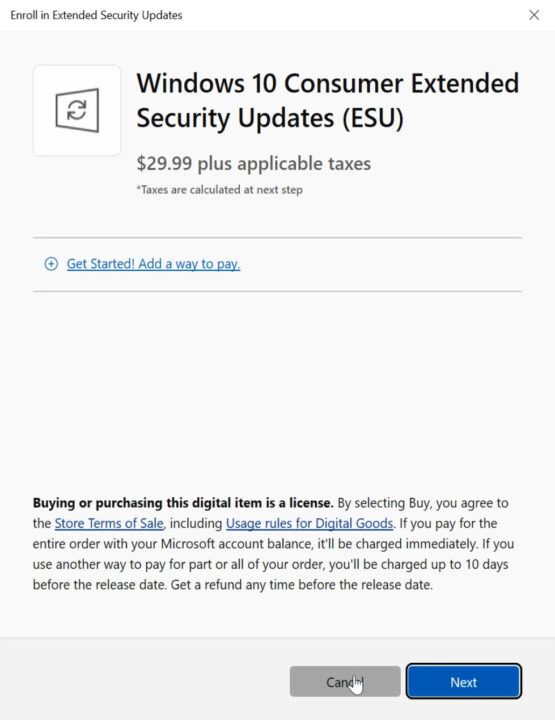
3. One-time Purchase ($30)
If you don’t want to enable backup or don’t have points, you can purchase extended updates for $30 per year.
👉 This is a paid option but gives peace of mind if you prefer not to sync data to Microsoft’s servers.
Step-by-Step Guide to Extend Support
Step 1: Open Windows Settings
Go to:
Start → Settings → Update & Security → Windows Update.
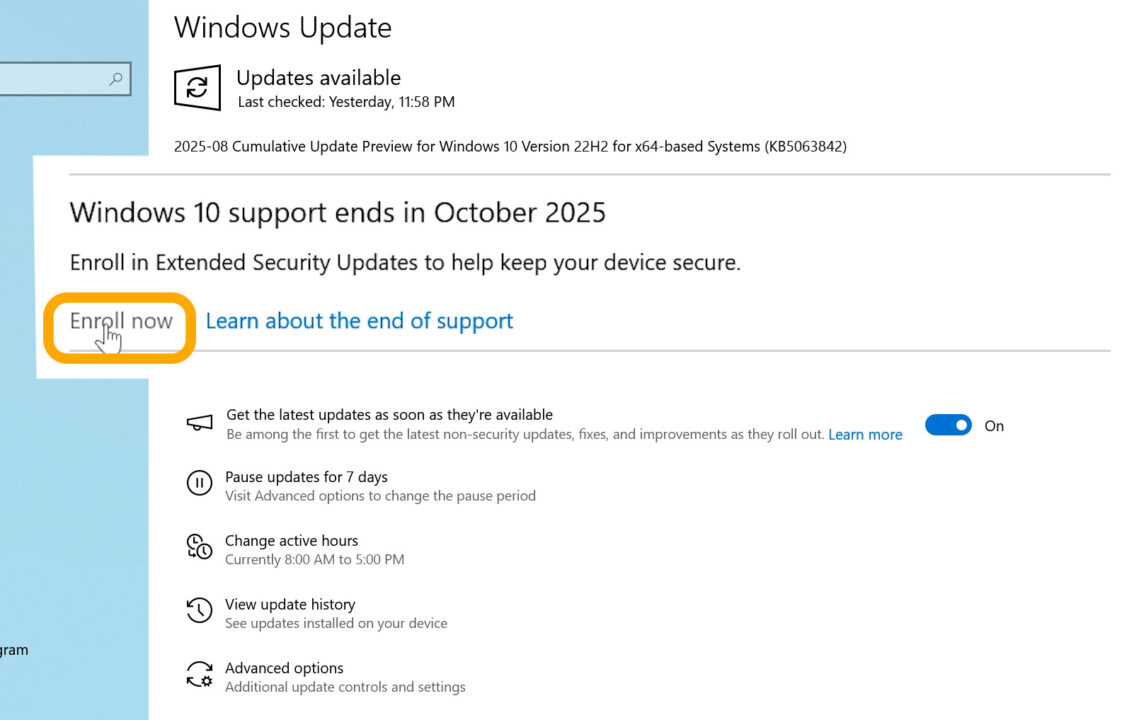
Step 2: Look for the “Enroll Now” Option
If your PC is eligible, you’ll see a message:
“Windows 10 support ends in October 2025. Enroll in extended security updates to help keep your device secure.”
Click Enroll Now.
👉 If you don’t see it yet, make sure you’re on the latest Windows 10 updates and check again after a few days.
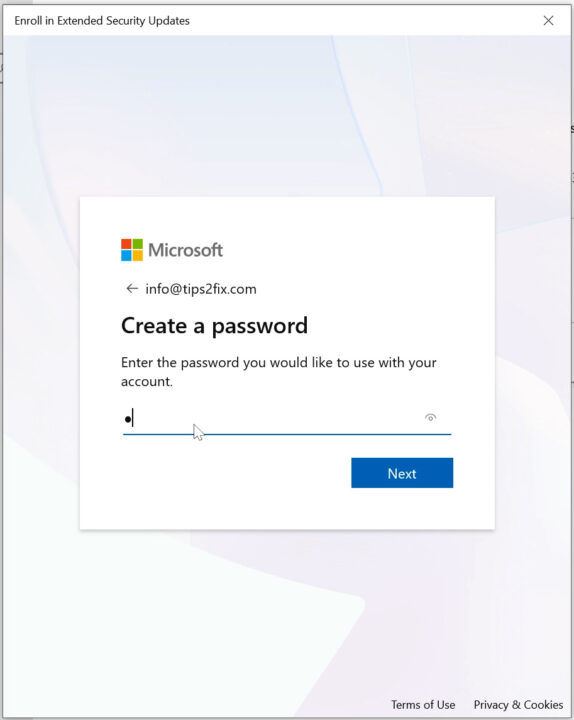
Step 3: Sign in with a Microsoft Account
You must sign in with a Microsoft account (or create a new one).
Follow the prompts to log in or set up a new account.
Step 4: Choose Your Option
-
Enable Backup → Get ESU for free.
-
Use 1,000 Rewards points → Redeem support.
-
Pay $30 one-time → Extend updates for 1 year.
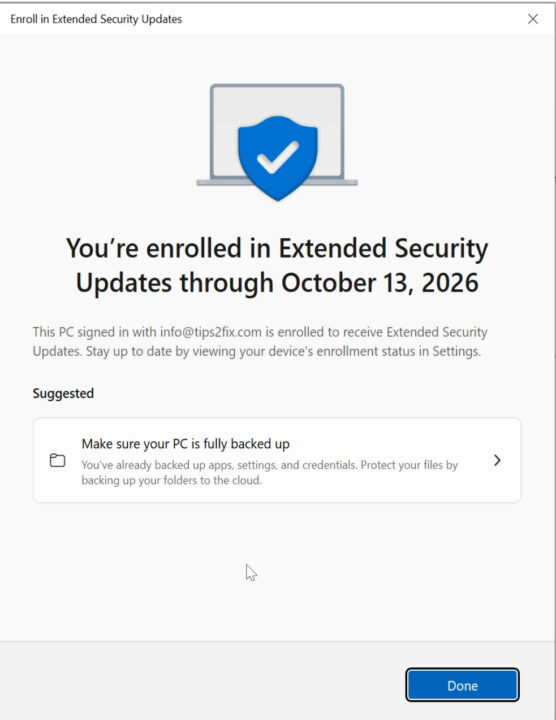
Step 5: Confirm Enrollment
After completing the process, you’ll see a confirmation message:
✅ “You are enrolled in Extended Security Updates through October 13, 2026.”
Congratulations – your PC is now protected for one more year!
Troubleshooting
-
Don’t see the “Enroll Now” button?
→ Update Windows 10 fully and wait a few days. -
No Microsoft account?
→ Create one for free during enrollment. -
Don’t want to back up your PC?
→ Use rewards points or the $30 option.
Final Thoughts
Extending Windows 10 security updates is a smart choice if:
-
You use older hardware that doesn’t support Windows 11.
-
You’re happy with Windows 10’s stability.
-
You want more time before upgrading.
👉 With the free backup option, most users can extend support at no cost.
👉 If you prefer more control, Microsoft Rewards or a one-time $30 purchase are alternatives.
Don’t wait too long – secure your system now and stay protected until October 2026.
Windows 10 ESU Enrollment Not Showing?
Here’s the Quick Fix!
🟢 Quick Method (may be enough)
The “Consumer ESU Feature” probably got switched off (it’s not broadly available yet)
you can try this to force enable it:
run the following in Command Prompt as administrator
- make sure “Connected User Experiences and Telemetry” (DiagTrack) service is not disabled
sc.exe config DiagTrack start= auto
sc.exe start DiagTrack- add the following registry
reg.exe add "HKLM\SYSTEM\CurrentControlSet\Policies\Microsoft\FeatureManagement\Overrides" /v 4011992206 /t REG_DWORD /d 2 /f- restart the system
- after restart, run the following in command prompt
cmd /c ClipESUConsumer.exe -evaluateEligibility reg.exe query "HKCU\SOFTWARE\Microsoft\Windows NT\CurrentVersion\Windows\ConsumerESU"- If you see a non-zero value, it worked ✅
-
If you see 0x0 or nothing, move on to the Full Method.
🔵 Full Method (if the quick one doesn’t work)
1.Open Command Prompt as Administrator and run:
reg.exe add "HKLM\SYSTEM\CurrentControlSet\Policies\Microsoft\FeatureManagement\Overrides" /v 4011992206 /t REG_DWORD /d 2 /f2. Open Windows PowerShell as Administrator and run the following blocks:
a) ReconcileFeatures
$TN = "ReconcileFeatures"; $TP = "\Microsoft\Windows\Flighting\FeatureConfig\";
$null = Enable-ScheduledTask $TN $TP
Start-ScheduledTask $TN $TP
while ((Get-ScheduledTask $TN $TP).State.value__ -eq 4) {start-sleep -sec 1}; "Task Completed"
b) UsageDataFlushing
$TN = "UsageDataFlushing"; $TP = "\Microsoft\Windows\Flighting\FeatureConfig\";
$null = Enable-ScheduledTask $TN $TP
Start-ScheduledTask $TN $TP
while ((Get-ScheduledTask $TN $TP).State.value__ -eq 4) {start-sleep -sec 1}; "Task Completed"
When finished, you should see Task Completed.
3. Restart your system.
4.Check eligibility again in Command Prompt as Administrator:
cmd /c ClipESUConsumer.exe -evaluateEligibility
reg.exe query "HKCU\SOFTWARE\Microsoft\Windows NT\CurrentVersion\Windows\ConsumerESU"
-
If the value is non-zero, Consumer ESU is enabled ✅
-
If it’s still 0x0 or missing, you’ll need to wait until Microsoft rolls out broad availability in your region.
Download ESU-Tools Script



Hi
Thanks for this. Quick method didn’t work for me, long method did something because I get a longish result when I run the reg.exe query, however despite this the Enroll Now button still won’t show up in Windows Update.
Not sure what to do now? (I am in the Netherlands).
Thank you!
PS: Windows is not connected to a Microsoft account, it’s used locally, but I don’t think it should matter?
Hi Philip 👋
If the quick method didn’t work, but the long one gave you results (0xa or 0xd), it means the registry edit was applied correctly.
Try restarting the PC and checking Windows Update again the “Enroll” button usually appears after reboot.
If not, it’s fine the ESU should still activate automatically for updates.