

Windows Movie Maker, part of the Windows Essentials 2012 suite, has not been available on Microsoft’s website since January 10, 2017. In this post, I share the original installer: the final version Microsoft released, untouched. The video at the top of this page shows how to install it.
In this article
Download the Official Windows Movie Maker (Windows Essentials 2012)
All three links download the same original setup file (wlsetup-all.exe). If one doesn’t work for you, use another one.
Download Link 1 (Google Drive) Download Link 2 (Direct From Tips2Fix) Download Link 3 (OneDrive)Note: Google Drive can’t scan large files for viruses, so it shows a warning page first. Click Download anyway to get the file.
Warning: Many websites claim to offer Movie Maker or an alternative, but most of them are not the real thing. Those versions can contain malware, adware or hidden costs. Always be careful what you download.
Tip: To check that your file is the genuine one, right-click wlsetup-all.exe, choose Properties and open the Digital Signatures tab. It should be signed by Microsoft Corporation.
What’s Included in Windows Essentials 2012
The file I share is the official, untouched setup of Windows Essentials 2012, which includes:
- Windows Movie Maker
- Windows Photo Gallery
- Windows Live Mail
- Microsoft Messenger
- And more
This is the last original version Microsoft published before it was discontinued. It works on Windows 7, Windows 8 and Windows 10.
How to Install Windows Movie Maker
- Download wlsetup-all.exe with one of the buttons above.
- Double-click the file to start the setup.
- Choose Choose the programs you want to install.
- Select Photo Gallery and Movie Maker (and anything else you want), then click Install.
- If Windows asks you to install .NET Framework 3.5, allow it, or follow Fix 3 below.
Watch the video at the top of this page to see the full installation.
Tools You May Need
.NET Framework 3.0:
Download .NET Framework 3.0.NET Framework 4:
Download .NET Framework 4Note: On Windows 10, .NET Framework 3.5 (which includes 3.0) is turned on in Windows Features instead (see Fix 3). Windows 8 and 10 already come with a newer .NET Framework 4, so the .NET Framework 4 download is mainly for Windows 7.
Common Error: Installation Problem 0x800c0006
If you see error 0x800c0006 while installing Windows Essentials, make sure you use the full offline installer (wlsetup-all.exe) from the buttons above.
The same error code can also appear when you install .NET Framework 4. First, check that your PC has a stable internet connection. The .NET Framework 4 web installer connects to the internet and downloads the package files. If the connection is not stable, the installer can’t reach the server to download them. Try these fixes.
Fix 1: Run the offline installer
Download the offline installer of .NET Framework 4 and install it on your computer. This way you don’t need an internet connection during the installation.
- Go to the .NET Framework 4 (Standalone Installer) page.
- Click Download to download the installer.
- Open the folder where the file was saved.
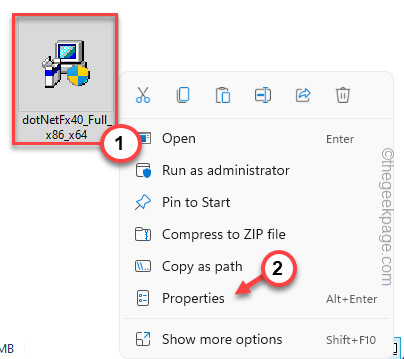
- Double-click the dotNetFx40_Full_x86_x64 installer file.
- Check I have read and accept the license terms.
- Click Install to install .NET Framework 4 on your computer.
You may have to restart your computer to complete the installation.
Fix 2: Unblock the installer
Windows sometimes blocks an installer file, especially when you copied it from another computer. You can easily unblock it:
- Go to the location of the installer file.
- Right-click it and choose Properties.
- Open the General tab.
- Check the Unblock box.
- Click Apply and OK.
Now run the installer again. This time it should work, and .NET Framework 4 should install on your system.
Fix 3: Enable .NET Framework 3.5
Enabling .NET Framework 3.5 may also solve the problem:
- Press Windows Key + R to open the Run box.
- Type this command and click OK:
optionalfeatures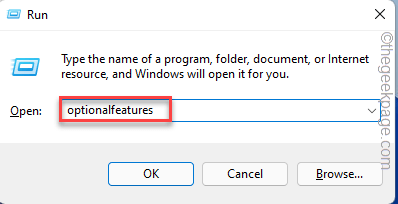
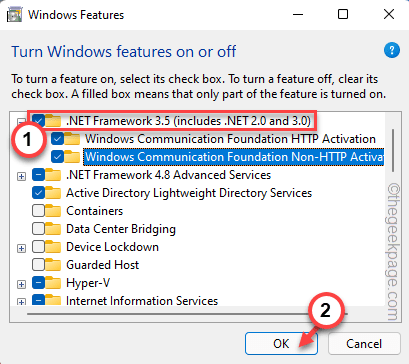
- In the Windows Features window, check .NET Framework 3.5 (includes .NET 2.0 and 3.0).
- Click OK to enable it.
Want to edit your videos faster? See How to Cut Large Video Files in Seconds Without Re-Encoding and How to Merge SRT Subtitles with Video.
luthy
browski
Hey,
I am reaching out to you from Install Panel. We provide ads on the download button. We don’t provide pop-ups, banners, or any kind of casino ads. Our ads are software-based. They don’t create interruption between your user and the website. We checked your website and we are willing to work with your site. Our CPM rates are higher than the other advertising networks. Our CPM rates are ranging from $25 to $50 per day, with flexible daily, weekly, and monthly payouts.
let’s discuss this further
Email: Kevininstallpanel@gmail.com
Best regards,
Kevin
Install Panel
Hey,
I am Evelyn from Adfinity reached out with an offer to boost website revenue using non-intrusive ads (download button and pop-under) that integrate seamlessly. They promise competitive average CPM rates ($20-$60/day), flexible daily, weekly or monthly payouts, 24/7 support, global traffic monetization, and a live stats dashboard. You should check one of our client example (Getintoway.com). We provided multiple contact options to discuss a potential partnership.
E*ail: evelynadfinity@gmail.com
Disc*rd: evelynadfinity
Wha*sA*p: +44 7476 435170
Best regards,
Evelyn
Adfinity